UNDERSTANDING ‘WHO’ AND ‘WHY’
Competitive analysis
To help define the problem space for the team, I undertook a competitive analysis by looking at industries with similar security requirements to the banking and finance sector, as well as those without. The cross-industry analysis revealed that:
Most Canadian banks currently don’t stray far from the card number and password/PIN paradigm
Many global banks are beginning to expand their authentication experience with biometric credentials and QR codes
Leading financial institutions are creating password-less authentication environments by implementing two-factor authentication processes that use push notifications and alternative authentication methods

Further inspiration came from market leaders outside of the banking sector, with platforms such as WhatsApp and WeChat offering much more flexibility to their users through complete device continuity between desktop and mobile.
THE USER’S ‘WHEN’ AND ‘WHERE’ LEADS TO OUR ‘WHAT’ AND ‘HOW’
Mass Survey
Our competitive analysis suggested that passwords dominate the mental model of security credentials among Canadians in the digital banking space. To test this assumption and how receptive some client segments might be towards new authentication methods, I conducted a survey aimed at uncovering attitudes and behaviour around passwords and other security alternatives. Some of our most significant findings included:
2 out of 5 Canadians have differentiated passwords across different websites and Apps
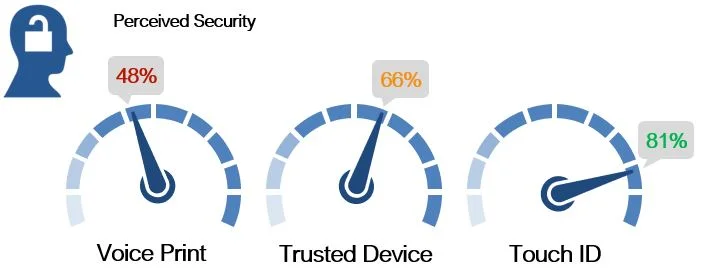
Touch ID, traditional passwords and one-time verification codes (OTVC) have the highest perception of security among the authenticators proposed in the survey, though OTVC is considered inconvenient
This survey demonstrated a positive perception towards password security among Canadians. However I was also able to demonstrate the receptiveness that this group has towards new methods such as Touch ID and registered devices, validating and refining some of our initial design ideas.
Ideation And prototyping
Taking points from the competitive analysis to inspire which new authentication methods would provide a good user experience, and in consultation with the client security team as to what is feasible from a security standpoint, a prototype was built that responded to the following hill statement:

A trusted device security protocol (i.e., a desktop or mobile device that a user registers to their CIBC account) was the main vehicle for our security solution, and was typically the first of two security steps along with either a Touch ID, QR Code, or behavioural biometric-based second step (i.e., the tracking of behavioural patterns such as typing speed in order to ensure the patterns match in the future).
FINE-TUNING THE USER EXPERIENCE
User Testing
The team’s designer and I devised multiple scenarios that would use our new security protocols within a prototype for user testing. While the prototype was being developed, I created a testing plan to probe the understanding and expectations of our users. Once completed, I ran guerilla-style user testing on CIBC clients at a nearby branch.
Participants in our testing sessions were asked to run through three scenarios following a think-aloud protocol. After each scenario they were asked to rate how secure they felt each security feature was, and how likely they would be to opt in to each one for their own online banking. Findings from testing included:
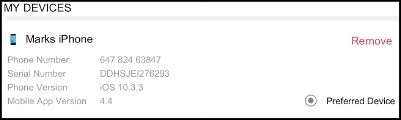

Many participants did not understand that having a device registered to their account was necessary for other security enhancements
Enhancement: The security features page was changed to bring greater focus and education on the registered device security feature.
Participants were not comfortable being automatically logged in using input-less authentication (through a registered device and behavioural biometrics) without selecting to do so first.
Enhancement: Due to both the insight above and issues raised by the security team, the behavioural biometric check was eliminated from our proposal as an authentication credential.
The instructions for the QR sign-on were unclear to some participants, especially those with less tech savvy.
Enhancement: Instructions for the QR sign-on for desktop using a mobile device were made clearer with pictorial instructions.
CONCLUDING THOUGHTS
This sprint provided a particularly fascinating UX contradiction; banking customers want the best possible security for their finances, but at the same time are wary of new and unfamiliar security features which nonetheless enhance the safety of digital banking. The password paradigm dominates the mental model of security credentials, but are easy enough to crack when users naturally create passwords that are easy to remember. Our solution for introducing new security protocols focussed on educating the user while maintaining their agency to use passwords, but future work could be done to see how to make the advertising of new security protocols more effective.